Transform Your Author Brand with Canva Fantasy Book Cover Mockups
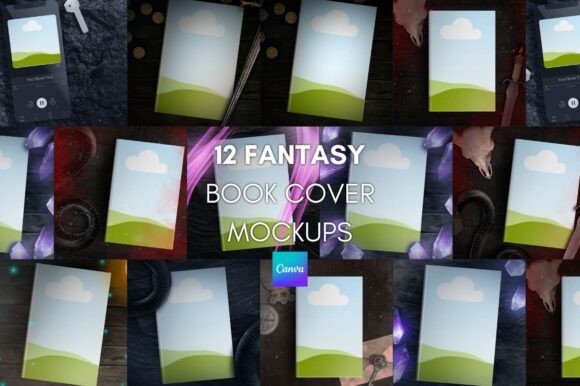
For fantasy authors, the book cover is more than just a protective wrapper; it is the promise of the world inside. However, translating that intricate, magical artwork into a cohesive social media strategy can be a headache. You have the manuscript, you have the stunning cover art, but how do you make it look professional on Instagram, Twitter, or your newsletter without spending hours in Photoshop? This is exactly where the Canva Fantasy Book Cover Mockups come into play. Designed specifically for the unique needs of the fantasy genre, this bundle of 12 mockups bridges the gap between your finished product and your marketing materials, allowing you to create scroll-stopping content in minutes.
The "Handmade" Advantage in a Digital World
In an era where AI-generated assets are flooding the market, there is a distinct value in craftsmanship. One of the most compelling aspects of this particular bundle is that all elements have been rendered in-house. You won't find generic, plastic-looking 3D models here. These renders possess a tactile quality that resonates with readers who love physical books. When you use these mockups, you are presenting your work with a level of integrity that synthetic filters simply cannot replicate.
From a branding perspective, this consistency is vital. Whether you are an indie publisher or a self-published author, your brand identity relies on visual cues that suggest quality. Using high-fidelity design assets ensures that your marketing doesn't look "cheap." When a potential reader sees your book on a styled desk, resting against a medieval backdrop, or held by a mysterious figure, the realism of the render helps them visualize owning the book. It shifts the perception from a digital file to a tangible product.
Streamlining Social Media Marketing
Social media algorithms favor consistency, but authors often struggle with the time required to produce daily content. The Canva Fantasy Book Cover Mockups solve this logistical problem. Because the bundle includes 12 different premade mock-ups, you effectively have a month’s worth of visual content ready to go. This is not just about saving time; it is about maintaining a professional rhythm.
The versatility of these social media graphics is a major asset. You can use them for:
- Launch Announcements: Create a cohesive grid on Instagram where every post features your book in a different setting.
- Reader Appreciation Posts: Showcase your book in a cozy, atmospheric scene to encourage readers to post their own photos.
- Sale Promotions: When you discount your eBook, placing the cover in a physical mockup adds perceived value to the sale.
- Newsletter Headers: Use a wide mockup as a banner image to break up text and add visual interest to your emails.
Unlike complex software like Photoshop, which requires understanding layers and smart objects, Canva is accessible. This democratization of design means you don't need to hire a graphic designer for every minor update. If you need to announce a price change or a new review, you can open the template, swap the text, and download the file in under five minutes.
Practical Tips for Editing and Customization
While the templates are designed to be user-friendly, a few technical nuances can help you achieve the best result. The product comes with a ZIP folder containing a PDF and a JPG. The JPG provides essential tips for editing, which is a thoughtful inclusion for those less familiar with the platform. The PDF contains the link to add the templates directly to your Canva account. It is important to note that Canva premium is NOT needed for these files, making this a cost-effective solution for authors on a budget.
When you open the templates, you will interact with frames. A common hurdle users face is selecting the correct layer. If you find that clicking on your book cover selects the background mockup instead, there is a simple fix. You need to move the frame ABOVE the mockup. Once the frame is on the top layer, add your cover image. After the image is placed, you can move the frame back down behind the foreground elements. This layering technique ensures your cover integrates seamlessly into the scene.
Visual Hierarchy and Brand Consistency
In marketing, visual hierarchy guides the viewer's eye. A flat image of a book cover is static; it tells the viewer what the book looks like, but not how it feels. By using Canva Fantasy Book Cover Mockups, you add depth and context. The lighting, shadows, and surrounding props create a mood that aligns with your genre. Dark, moody mockups suit epic fantasy or grimdark, while brighter, nature-based settings might fit young adult or urban fantasy.
This consistency strengthens your brand identity. When a follower sees your post, they should immediately recognize the aesthetic before they even read the caption. Over time, this builds recognition. You are not just selling a story; you are selling an aesthetic experience. These mockups act as a bridge between your narrative voice and your visual voice.
Addressing Technical Challenges
No digital product is without its quirks, and it is helpful to know how to troubleshoot them. Occasionally, an author’s cover design—perhaps one with very dark tones—might look too shadowy when placed inside a mockup environment. This is because the mockup has its own lighting source. Fortunately, Canva includes robust editing tools. You don't need to be a graphic design expert to fix this. Simply click on your uploaded cover image within the frame, select "Edit Image," and adjust the brightness or contrast sliders. This ensures your title remains legible, which is the primary goal of typography in marketing.
Furthermore, consider the context of your web design and digital presence. If you use these mockups on your website, ensure the file size is optimized so it doesn't slow down your page load time. While Canva allows for high-quality downloads, resizing for the web is a good practice for maintaining site speed and SEO performance.
Real-World Application: Beyond the Feed
While these are marketed for social media, think outside the box. These design assets can be used for:
- Podcast Artwork: If you are a guest on a podcast, providing a professional mockup of your book helps the host create better show notes.
- Press Kits: When sending information to bloggers or reviewers, include a high-res mockup. It makes it easier for them to write about you because they have a ready-made visual.
- Merchandise Previews: If you sell bookmarks or art prints, you can use similar styling to create a cohesive "world" for your merchandise.
Final Verdict
For the modern author, the ability to produce professional graphic design quickly is a competitive advantage. The Canva Fantasy Book Cover Mockups offer a practical, high-quality solution that respects the creator's time and budget. By utilizing in-house rendered assets that avoid the uncanny valley of AI art, and by providing a system that requires no premium subscription, this bundle empowers authors to take control of their visual marketing. Whether you are launching a debut novel or revitalizing a backlist, these mockups provide the visual polish needed to stand out in a crowded digital landscape.