Design Stunning Custom Mugs with This 11oz Mug Template
Why This Mug SVG Full Wrap is a Game-Changer for Creators
If you've ever tried designing a custom mug from scratch, you know the struggle. Getting the dimensions right, ensuring the wrap meets seamlessly, and formatting the file for different software can eat up hours you'd rather spend creating. That's where a reliable 11oz Mug Template comes in. This particular Mug SVG Full Wrap set eliminates the guesswork entirely, giving you a professional foundation to build on—whether you're crafting a one-off gift or launching a product line.
The appeal here isn't just convenience. It's about consistency. When you use a properly sized and formatted template, every mug you produce looks intentional. The curves align. The text wraps naturally. The imagery sits exactly where it should. For anyone serious about packaging design or physical product creation, that kind of precision matters more than most people realize.
What Makes This Sublimation Template Stand Out
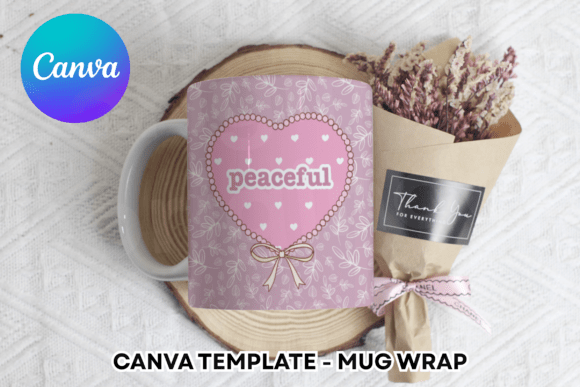
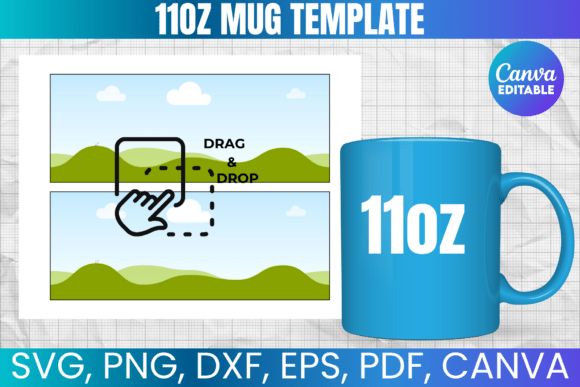
This isn't a one-size-fits-all generic file tossed together without thought. The 11oz Mug Template is specifically engineered for standard 11oz mugs—the most popular size in the custom drinkware market. The Mug SVG Full Wrap format means your design covers the entire printable surface, from handle to handle, with no awkward gaps or misaligned edges.
You're getting multiple file formats, which is a detail that separates a polished design asset from a frustrating download. The set includes:
- SVG file compatible with Cricut, Silhouette, Inkscape, and other vector-based programs
- PNG file with a transparent background for layering and compositing
- DXF file for Silhouette users who prefer that format
- PDF file with a white background for straightforward printing
- Canva template link for drag-and-drop editing without specialized software
That Canva link alone is worth noting. Not everyone has access to Adobe Photoshop or wants to learn Cricut Design Space just to test an idea. Being able to open a browser, drag in your artwork, and see a realistic preview of your mug design lowers the barrier to entry significantly. For bloggers, small business owners, and hobbyists exploring custom mug design for the first time, that accessibility changes everything.
Real-World Applications Across Industries
Let's talk about where this template actually earns its keep. The obvious use case is sublimation printing—the heat-transfer process that bonds ink directly into the mug's coating. But the applications stretch far beyond that single technique.
Entrepreneurs and small business owners can use the Mug SVG Full Wrap to prototype products before committing to a bulk order. Instead of paying a manufacturer for samples, you can mock up dozens of designs digitally, test color combinations, and refine your layout until it's production-ready. That kind of rapid iteration saves real money.
Content creators and bloggers often need branded merchandise for giveaways, sponsorships, or audience engagement. A well-designed mug with your logo or a signature illustration becomes a tangible touchpoint—something followers actually use and display. The template ensures your brand identity translates cleanly from screen to physical product.
Marketers and agencies working on corporate gifting campaigns will find the 11oz Mug Template particularly useful for client presentations. Instead of describing what a branded mug might look like, you can show a realistic mockup. That visual proof moves conversations forward faster than any pitch deck.
Even crafters and hobbyists benefit. If you're making personalized mugs for weddings, birthdays, or holiday gifts, starting with a properly formatted sublimation template means fewer wasted blanks and less frustration. The template handles the technical side so you can focus on the creative part.
Compatibility and Workflow Integration
One of the strongest aspects of this design asset is how it fits into existing workflows. The files work across Cricut Design Space, Silhouette Studio, Adobe Photoshop, Canva, and other popular platforms. You don't need to switch tools or learn new software just to use the template.
That said, a few practical notes are worth mentioning. Cricut users should be aware that manual resizing may be necessary depending on their machine settings and the included measurements. The template is formatted for an 8.5"x11" print layout, which matches standard home printer paper—convenient for test prints before committing to sublimation paper.
The files are sized to fit standard 11oz mugs, but it's always smart to double-check dimensions against your specific blanks. Mug manufacturers occasionally vary by a millimeter or two, and that small difference can affect how the wrap meets at the seam. A quick measurement before you print eliminates surprises.
Practical Tips for Better Mug Designs
Using a template is the starting point, not the finish line. Here are a few observations from working with full wrap designs that might save you some trial and error:
- Account for the handle gap. The area near the handle isn't printable, so avoid placing critical text or imagery in that zone. The template marks this clearly, but it's worth emphasizing.
- Test your color choices. Sublimation inks behave differently than screen colors. What looks vibrant on your monitor may appear muted on ceramic. Print a test strip before wrapping the entire mug.
- Keep text readable at a distance. Mugs are viewed from arm's length, not six inches away. Choose legible typefaces and avoid cramming too much information onto the surface.
- Consider the drinking angle. The most visible area of a mug is the front-facing section opposite the handle. Prioritize your primary design element there.
- Use the Canva link for quick revisions. If a client or recipient wants changes, Canva's interface makes edits fast without reopening design software.
Licensing and What You Can Create
This is an important distinction for anyone planning to sell products. You can use the templates to create physical products for sale—mugs, drinkware, promotional items. That commercial permission makes this a practical investment for side hustlers and established businesses alike.
What you cannot do is redistribute or resell the digital files themselves. The template is a tool, not a finished product. Think of it like a set of professional rulers or cutting mats—you use them to make things, but you don't resell the tools as your own creation.
This licensing model is standard across the design asset marketplace and strikes a fair balance. Creators get access to professional-grade resources without prohibitive costs, while designers retain ownership of their original work.
Getting Started Without Overthinking It
The biggest hurdle with any new design asset is simply opening the file and experimenting. You don't need a perfect concept on day one. Import the 11oz Mug Template into your preferred software, drop in a test image, and see how it looks. Adjust the placement. Try a different color palette. Play with typography.
The template handles the structural complexity—curvature, dimensions, print formatting—so your creative energy goes where it should: into making something people actually want to hold in their hands. Whether you're building a product catalog, creating personalized gifts, or prototyping a brand extension, this Mug SVG Full Wrap gives you a reliable starting point that respects both your time and your craft.
And if you hit a snag, the creator offers direct support. That kind of responsiveness turns a good template into a genuinely useful resource—especially for anyone still building confidence with sublimation design workflows.