Men's Back of Shirt Mockup Canva Frame: Professional Visuals
The Realism Your T-Shirt Designs Deserve
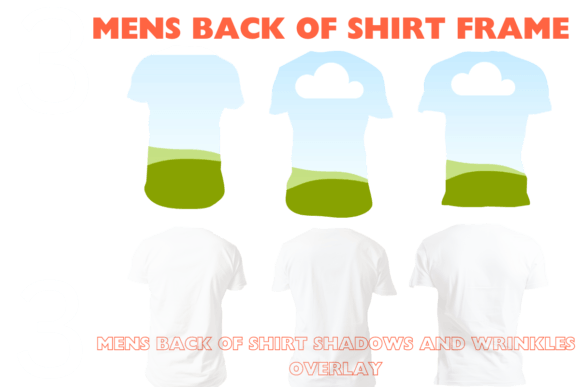
When you're trying to sell a t-shirt design online, a flat graphic just doesn't cut it. Customers want to see how a design will actually look on a garment. They want to visualize the fit, the drape, and how the ink sits on the fabric. This is precisely where the Men's Back of Shirt Mockup Canva Frame becomes an indispensable tool for your creative toolkit. It’s a set of three high-resolution templates designed to bridge the gap between your digital artwork and a tangible product.
Unlike static image files, these are interactive Canva frames. Think of them as a digital mannequin. You don't need complex software like Photoshop to create a professional presentation. The core of this product is its simplicity. You simply drag your design file onto the designated area within the Canva template, and it automatically conforms to the shirt's shape and perspective. This immediate feedback loop lets you see your idea come to life in seconds, which is crucial when you're iterating on color schemes or graphic placements.
Visual Characteristics and Practical Appeal
The personality of these mockups is clean, versatile, and professional. The base is a crisp white t-shirt, which acts as a neutral canvas. This design choice is intentional; it ensures your artwork remains the hero. Whether you're showcasing a bold, colorful graphic or a subtle, minimalist line drawing, the white background won't compete for attention. The three different back views—a straight-on shot, a slight angle, and a more dynamic perspective—give you variety without needing to source multiple assets.
What truly elevates this tool is the layering system. Each mockup comes with separate wrinkle and shadow overlays. In design terms, this gives you granular control over the final image's texture and depth. You can add a subtle shadow to ground the shirt in a scene or apply a light wrinkle overlay to make the print look more integrated and less like a sticker. This level of detail is what separates amateurish mockups from visuals that build trust with potential buyers. It’s about creating a realistic overlay that captures the tactile quality of a printed tee.
Where This Mockup Set Shines
The applications for this asset are broad, but they center on a few key areas where visual presentation directly impacts success.
- Etsy and E-commerce Listings: This is its primary arena. A well-presented product image can significantly increase click-through rates and conversions. Instead of just showing your design, you're selling a product. The high-resolution images (300 DPI) ensure your listing looks sharp on any screen, from a phone to a desktop monitor.
- Print-on-Demand Businesses: For entrepreneurs using services like Printful or Printify, creating new product visuals for every design variation can be time-consuming. This instant download lets you quickly generate mockups for new colorways or design tweaks without waiting for sample photos.
- Social Media Marketing: Creating engaging content for Instagram, Facebook, or Pinterest requires a steady stream of fresh visuals. These mockups allow you to create eye-catching posts that showcase your latest designs in a professional context, helping to build a cohesive brand identity.
- Client Presentations: For freelance designers, presenting concepts in context is vital. Showing a client how their logo or artwork looks on a t-shirt back is far more compelling than a flat PDF. It demonstrates foresight and professionalism, key components of strong graphic design and brand strategy.
Integrating Mockups Into Your Design Workflow
Using the Men's Back of Shirt Mockup Canva Frame is straightforward, but a few best practices can enhance your results. First, always start with a high-quality, transparent PNG of your design. This ensures clean edges and accurate color representation. Once you drag it into the frame, use Canva's tools to adjust its scale and position. Consider the principles of visual hierarchy; where does the eye naturally go on the back of a shirt?
Don't be afraid to experiment with the overlays. A heavy shadow might work for a moody, lifestyle-focused brand, while a clean, overlay-free look might be better for a minimalist aesthetic. Test your final mockup at the size it will be viewed. Does the design remain clear and impactful as a small thumbnail on a marketplace? This simple check can save you from creating visuals that get lost in a crowded search results page.
Ultimately, this tool is about efficiency and quality. It provides a practical solution to a common challenge for apparel designers and sellers. By allowing you to create realistic, professional-grade visuals directly within an accessible platform like Canva, it empowers you to present your work with the confidence it deserves. It’s a straightforward asset that solves a real problem, helping you move from concept to market-ready presentation with minimal friction. For anyone serious about selling or showcasing t-shirt designs, having a reliable set of mockup templates isn't a luxury—it's a fundamental part of the creative and commercial process.